Currency conversion with the widget
With our payment widget, you can allow your users to make payments in a currency other than that specified for a service or item. The widget will show them the target amount calculated at the current exchange rate along with the period of time during which this rate is guaranteed. To enable this functionality, please contact your Account Manager.
You can set a single target currency for a project. The source currency can be any currency.
Making a currency conversion payment
For example, a user wants to make a payment in euros for a service that is priced in US dollars.
-
Create a session using the
session/createmethod.
In response, you will get theexchange_amountsobject containing the source amount, target amount, and applied rate.Request example
curl -X POST \https://demo.smart-glocal.com/api/v1/session/create \-H 'content-type: application/json' \-H 'X-PARTNER-PROJECT: your_project_name' \-H 'X-PARTNER-SIGN: signature' \-d '{"amount_details": {"amount": 100,"currency": "eur"},"participant_details": {"recipient": {"full_name": "John Richards"}},"customer": {"reference": "smgl_widget_test"}}'Response example
curl -X POST \https://partner.com \-H 'content-type: application/json' \-H 'X-PARTNER-SIGN: signature' \-d '{"status": "ok","session": {"id": "ps_3240","status": "created","created_at": "2026-02-25T11:44:26.920749Z","updated_at": "2026-02-25T11:44:26.920749Z","exchange_amounts": [{"source": {"amount": 100,"currency": "eur"},"destination": {"amount": 136,"currency": "usd"},"rate": 1.358822,"rate_source": "oer","reserved_to": 1772019896}]}}' -
Send a
tokenrequest to create a token using the returned session identifier and specifying the widget name. As a result you will receive a public token.Request example
curl -X POST \http://demo.smart-glocal.com/api/v1/token \-H 'Content-Type: application/json' \-H 'X-PARTNER-PROJECT: your_project_name' \-H 'X-PARTNER-SIGN: signature' \-d '{"acquiring_widget": {"session_id": "ps_3240"}}' -
Use the returned public token to initialize the widget.
Example
const paymentForm = new SmglPaymentForm(publicToken); -
To display the payment form, call the
render()method:Example
paymentForm.render(); -
Let the user interact with the widget through all the required steps. The user will see the target amount in the target currency and the time left to pay at the specified rate.
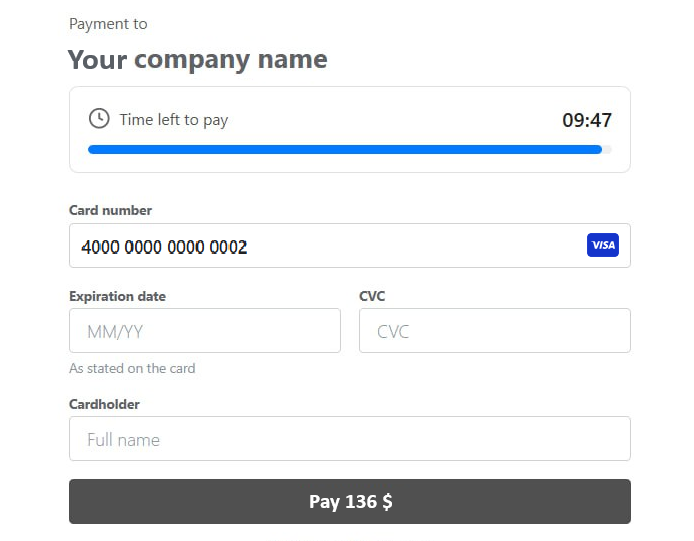
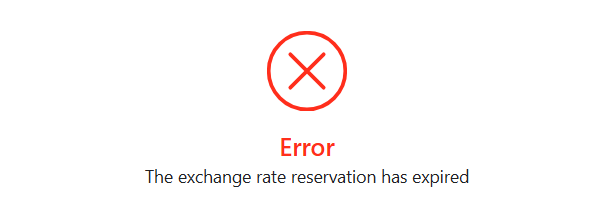
If the user fails to pay within the specified time, an error will be displayed and the transaction will need to be restarted.
-
Wait for a
ready_to_confirmwebhook. When you receive it, it means that Smart Glocal is ready to make the payment and is waiting for your confirmation. -
Send a
session/confirmrequest to confirm the operation or asession/cancelrequest to cancel it. -
After the customer makes the payment, you will receive a
payment_finishedwebhook containing the payment result from Smart Glocal.Webhook example
curl -X POST \https://partner.com \-H 'content-type: application/json' \-H 'X-PARTNER-SIGN: signature' \-d '{"type": "payment_finished","session": {"id": "ps_3240","status": "accepted","created_at": "2026-02-23T16:03:03.860365Z","updated_at": "2026-02-23T16:03:31.059975Z","acquiring_payments": [{"id": "pm_5810","status": "succeeded","created_at": "2026-02-23T16:03:30.908738Z","finished_at": "2026-02-23T16:03:31.033735Z","customer": {"reference": "lucky"},"payment_details": {"type": "card","card": {"brand": "visa","last4": "4242","country_iso3": "GBR"}},"amount_details": {"amount": 100,"currency": "EUR"},"amounts": {"fee": {"merchant_fee": {"amount": 1,"currency": "EUR"},"submerchant_custom_fee": {"amount": 1,"currency": "EUR"}}}}],"actions": {"confirm": "2026-02-23T16:03:30.950008Z","capture": "2026-02-23T16:03:30.998963Z"},"exchange_amounts": [{"source": {"amount": 100,"currency": "EUR"},"destination": {"amount": 136,"currency": "usd"},"rate": 1.358822,"rate_source": "oer","reserved_to": 1772019896}]}}'