Bre-B payments in Colombia
You can make Bre-B payments in Colombia in Colombian pesos (COP).
COP has no minor currency units. To pay 10,000 COP, write 10000 in amount_details.amount.
No recurring payments are available.
Required sender parameters
Check all the required parameters
| Name | Type | Description |
|---|---|---|
participant_details | object | Information on the participants |
sender | object | Sender details |
document | string | CC or NIT (6 to 11 digits) |
Making a payment
-
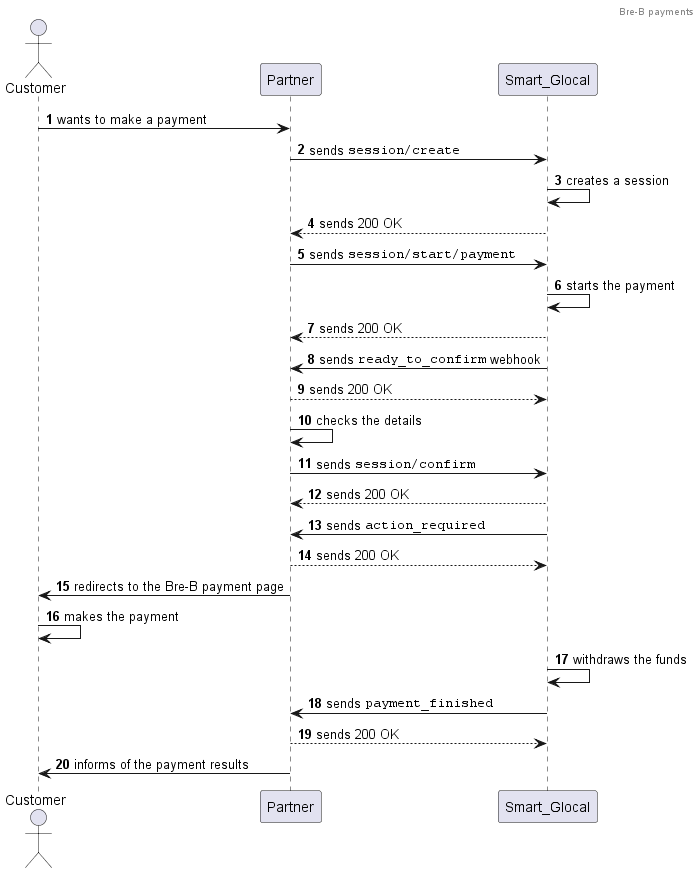
Create a session using the
session/createmethod.Alternatively, you can use the
session/init/paymentmethod. In this case, specify all the payment parameters right away and skip the next step. -
Send a
session/start/paymentrequest. Specify the following parameters:country_ewallet_brebininternet_banking.typeCOininternet_banking.country_ewallet.country_iso2- the payer's
documentinparticipant_details.sender. The payer'sfull_name,email, andmsisdnare optional.
Optionally, you can add a return URL to redirect the customer back after the payment (payment_options.return_url).
Request example
curl -X POST \https://demo.smart-glocal.com/api/v1/session/start/payment \-H 'content-type: application/json' \-H 'X-PARTNER-PROJECT: your_project_name' \-H 'X-PARTNER-SIGN: signature' \-d '{"session_id": "ps_12345","payment_details": {"type": "internet_banking","internet_banking": {"type": "country_ewallet_breb","country_ewallet": {"country_iso2": "CO"}}},"amount_details": {"amount": 10000,"currency": "cop"},"customer": {"reference": "qwiqwi"},"participant_details": {"sender": {"document": "123456"}},"payment_options": {"return_url": "https://smart-glocal.com/","recurrent": false}}'Response example
curl -X POST \https://partner.com \-H 'content-type: application/json' \-H 'X-PARTNER-SIGN: signature' \-d '{"status": "ok","session": {"id": "ps_12345","status": "in_progress","created_at": "2025-12-04T19:28:58.077701Z","updated_at": "2025-12-04T19:29:23.216667Z","acquiring_payments": [{"id": "pm_12354","status": "in_progress","created_at": "2025-12-04T19:29:23.217101Z","customer": {"reference": "qwiqwi"},"payment_details": {"type": "internet_banking","internet_banking": {"type": "country_ewallet_breb","country_ewallet": {"country_iso2": "CO"}}},"amount_details": {"amount": 10000,"currency": "cop"},"participant_details": {"sender": {"document": "123456"}},"payment_options": {"return_url": "https://smart-glocal.com/","recurrent": false}}]}}' -
Wait for a
ready_to_confirmwebhook. When you receive it, it means that Smart Glocal is ready to make the payment and is waiting for your confirmation.Webhook example
curl -X POST \https://partner.com \-H 'content-type: application/json' \-H 'X-PARTNER-SIGN: signature' \-d '{"type": "ready_to_confirm","status": "ok","session": {"id": "ps_12345","status": "in_progress","created_at": "2025-12-04T19:28:58.077701Z","updated_at": "2025-12-04T19:29:23.216667Z","acquiring_payments": [{"id": "pm_12354","status": "pending","created_at": "2025-12-04T07:48:28.296138Z","customer": {"reference": "qwiqwi"},"payment_details": {"type": "internet_banking","internet_banking": {"type": "country_ewallet_breb","country_ewallet": {"country_iso2": "CO"}}},"amount_details": {"amount": 10000,"currency": "cop"},"participant_details": {"sender": {"document": "123456"}},"payment_options": {"return_url": "https://smart-glocal.com/","recurrent": false}}],"actions": {"confirm": "2025-12-04T07:48:28.275964Z"}}}' -
Send a
session/confirmrequest to confirm the operation or asession/cancelrequest to cancel it.Request example
curl -X POST \https://demo.smart-glocal.com/api/v1/session/confirm \-H 'content-type: application/json' \-H 'X-PARTNER-PROJECT: your_project_name' \-H 'X-PARTNER-SIGN: signature' \-d '{"session_id":"ps_12345"}' -
Wait for an
action_requiredwebhook. Thecustomer_interaction.redirect.urlparameter contains a link to the Bre-B payment page.Webhook example
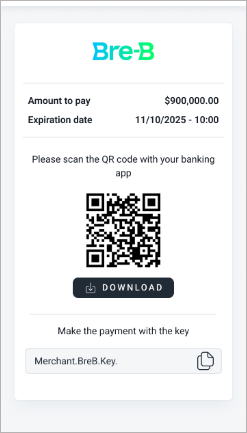
curl -X POST \https://partner.com \-H 'content-type: application/json' \-H 'X-PARTNER-SIGN: signature' \-d '{"type": "action_required","status": "ok","session": {"id": "ps_12345","status": "in_progress","created_at": "2025-12-04T07:48:28.275964Z","updated_at": "2025-12-04T07:48:28.958891Z","acquiring_payments": [{"id": "pm_12354","status": "pending","created_at": "2025-12-04T07:48:28.296138Z","customer": {"reference": "qwiqwi"},"payment_details": {"type": "internet_banking","internet_banking": {"type": "country_ewallet_breb","country_ewallet": {"country_iso2": "CO"}}},"amount_details": {"amount": 10000,"currency": "cop"},"participant_details": {"sender": {"document": "123456"}},"customer_interaction": {"type": "redirect","redirect": {"url": "https://redirect-url-example.com/12345","base_url": "https://redirect-url-example.com/12345","method": "GET","params": {}}},"metadata": {"key": "value"},"payment_options": {"return_url": "https://smart-glocal.com/","recurrent": false}}],"actions": {"confirm": "2025-12-04T07:48:28.327146Z"}}}'5.1 The customer redirected by the link from the webhook lands on a page with the payment details and copies the Bre-B key.
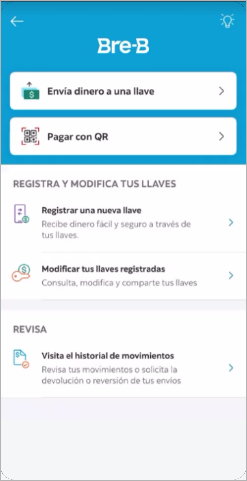
5.2 In the bank app, the customer chooses to pay by key.
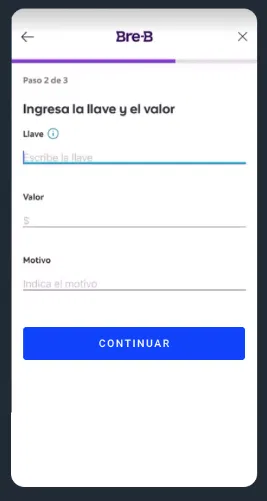
5.3 The customer enters the payment key and the payment amount.
The amount must match the invoiced amount. Otherwise, the payment will fail.
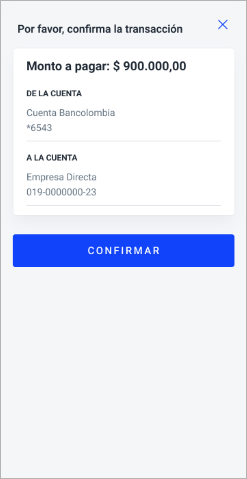
5.4 The customer confirms the payment in the bank app.
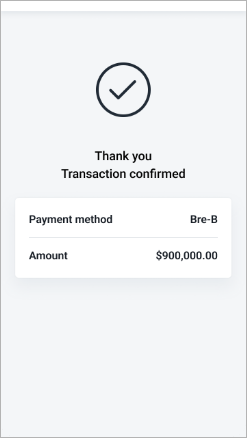
5.5 After the customer confirms the payment, a message on successful payment appears on the page.
-
After the customer makes the payment, you will receive a
payment_finishedwebhook containing the payment result from Smart Glocal. Thesucceededstatus indicates a successful payment.Webhook example
curl -X POST \https://partner.com \-H 'content-type: application/json' \-H 'X-PARTNER-SIGN: signature' \-d '{"type": "payment_finished","status": "ok","session": {"id": "ps_12345","status": "accepted","created_at": "2025-12-04T07:48:28.275964Z","updated_at": "2025-12-04T07:49:43.022068Z","acquiring_payments": [{"id": "pm_12354","status": "succeeded","created_at": "2025-12-04T07:48:28.296138Z","finished_at": "2025-12-04T07:49:43.002789Z","customer": {"reference": "qwiqwi"},"payment_details": {"type": "internet_banking","internet_banking": {"type": "country_ewallet_breb","country_ewallet": {"country_iso2": "CO"}}},"amount_details": {"amount": 10000,"currency": "cop"},"participant_details": {"sender": {"document": "123456"}},"metadata": {"key": "value"},"payment_options": {"return_url": "https://smart-glocal.com/","recurrent": false}}],"actions": {"confirm": "2025-12-04T07:48:28.327146Z","capture": "2025-12-04T07:49:42.965552Z"}}}'
Sequence diagram