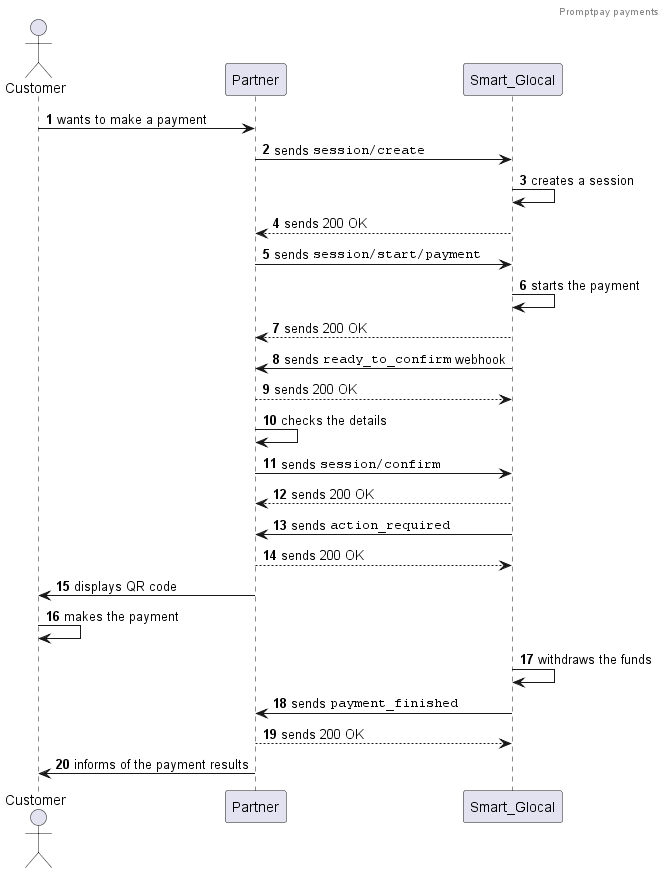
PromptPay payments in Thailand
You can make local PromptPay payments in Thailand in Thai baht (THB).
No recurring payments are available.
Making a payment
-
Create a session using the
session/createmethod.Alternatively, you can use the
session/init/paymentmethod. In this case, specify all the payment parameters right away and skip the next step. -
Send a
session/start/paymentrequest. Specify the following parameters:country_ewallet_promptpayininternet_banking.typecountry_iso2 = THininternet_banking.country_ewallet- the payer's
full_name,email, and 13-digit Thai Identity Card indocumentinparticipant_details.sender
Optionally, you can add a return URL to redirect the customer back after the payment (payment_options.return_url).
Request example
curl -X POST \https://demo.smart-glocal.com/api/v1/session/start/payment \-H 'content-type: application/json' \-H 'X-PARTNER-PROJECT: your_project_name' \-H 'X-PARTNER-SIGN: signature' \-d '{"session_id": "ps_12345","payment_details": {"type": "internet_banking","internet_banking": {"type": "country_ewallet_promptpay","country_ewallet": {"country_iso2": "TH"}}},"amount_details": {"amount": 10000,"currency": "thb"},"customer": {"reference": "qwiqwi"},"participant_details": {"sender": {"full_name": "Name Surname","email": "email@example.com","document": "1234567890123"}},"payment_options": {"return_url": "https://smart-glocal.com/","recurrent": false}}'Response example
curl -X POST \https://partner.com \-H 'content-type: application/json' \-H 'X-PARTNER-SIGN: signature' \-d '{"status": "ok","session": {"id": "ps_12345","status": "in_progress","created_at": "2025-12-04T19:28:58.077701Z","updated_at": "2025-12-04T19:29:23.216667Z","acquiring_payments": [{"id": "pm_12354","status": "in_progress","created_at": "2025-12-04T19:29:23.217101Z","customer": {"reference": "qwiqwi"},"payment_details": {"type": "internet_banking","internet_banking": {"type": "country_ewallet_promptpay","country_ewallet": {"country_iso2": "TH"}}},"amount_details": {"amount": 10000,"currency": "thb"},"participant_details": {"sender": {"full_name": "Name Surname","email": "email@example.com","document": "1234567890123"}},"payment_options": {"return_url": "https://smart-glocal.com/","recurrent": false}}]}}' -
Wait for a
ready_to_confirmwebhook. When you receive it, it means that Smart Glocal is ready to make the payment and is waiting for your confirmation.Webhook example
curl -X POST \https://partner.com \-H 'content-type: application/json' \-H 'X-PARTNER-SIGN: signature' \-d '{"type": "ready_to_confirm","status": "ok","session": {"id": "ps_12345","status": "in_progress","created_at": "2025-12-04T19:28:58.077701Z","updated_at": "2025-12-04T19:29:23.216667Z","acquiring_payments": [{"id": "pm_12354","status": "pending","created_at": "2025-12-04T19:29:23.217101Z","customer": {"reference": "qwiqwi"},"payment_details": {"type": "internet_banking","internet_banking": {"type": "country_ewallet_promptpay","country_ewallet": {"country_iso2": "TH"}}},"amount_details": {"amount": 10000,"currency": "thb"},"participant_details": {"sender": {"full_name": "Name Surname","email": "email@example.com","document": "1234567890123"}},"payment_options": {"return_url": "https://smart-glocal.com/","recurrent": false}}],"actions": {"confirm": "2025-12-04T07:48:28.275964Z"}}}' -
Send a
session/confirmrequest to confirm the operation or asession/cancelrequest to cancel it.Request example
curl -X POST \https://demo.smart-glocal.com/api/v1/session/confirm \-H 'content-type: application/json' \-H 'X-PARTNER-PROJECT: your_project_name' \-H 'X-PARTNER-SIGN: signature' \-d '{"session_id":"ps_12345"}' -
Wait for an
action_requiredwebhook. Thecustomer_interaction.redirect.urlparameter contains a link to the local payment method page.Webhook example
curl -X POST \https://partner.com \-H 'content-type: application/json' \-H 'X-PARTNER-SIGN: signature' \-d '{"type": "action_required","status": "ok","session": {"id": "ps_12345","status": "in_progress","created_at": "2025-12-04T07:48:28.296138Z","updated_at": "2025-12-04T07:48:28.958891Z","acquiring_payments": [{"id": "pm_12354","status": "pending","created_at": "2025-12-04T07:48:28.296138Z","customer": {"reference": "qwiqwi"},"participant_details": {"sender": {"full_name": "Name Surname","email": "email@example.com","document": "1234567890123"}},"payment_details": {"type": "internet_banking","internet_banking": {"type": "country_ewallet_promptpay","country_ewallet": {"country_iso2": "TH"}}},"amount_details": {"amount": 10000,"currency": "thb"},"customer_interaction": {"type": "redirect","redirect": {"url": "https://redirect-url-example.com/12345","base_url": "https://redirect-url-example.com/12345","method": "GET","params": {}}},"metadata": {"key": "value"},"payment_options": {"return_url": "https://smart-glocal.com/","recurrent": false}}],"actions": {"confirm": "2025-12-04T07:48:28.327146Z"}}}'5.1 Show the user the QR code on your page:
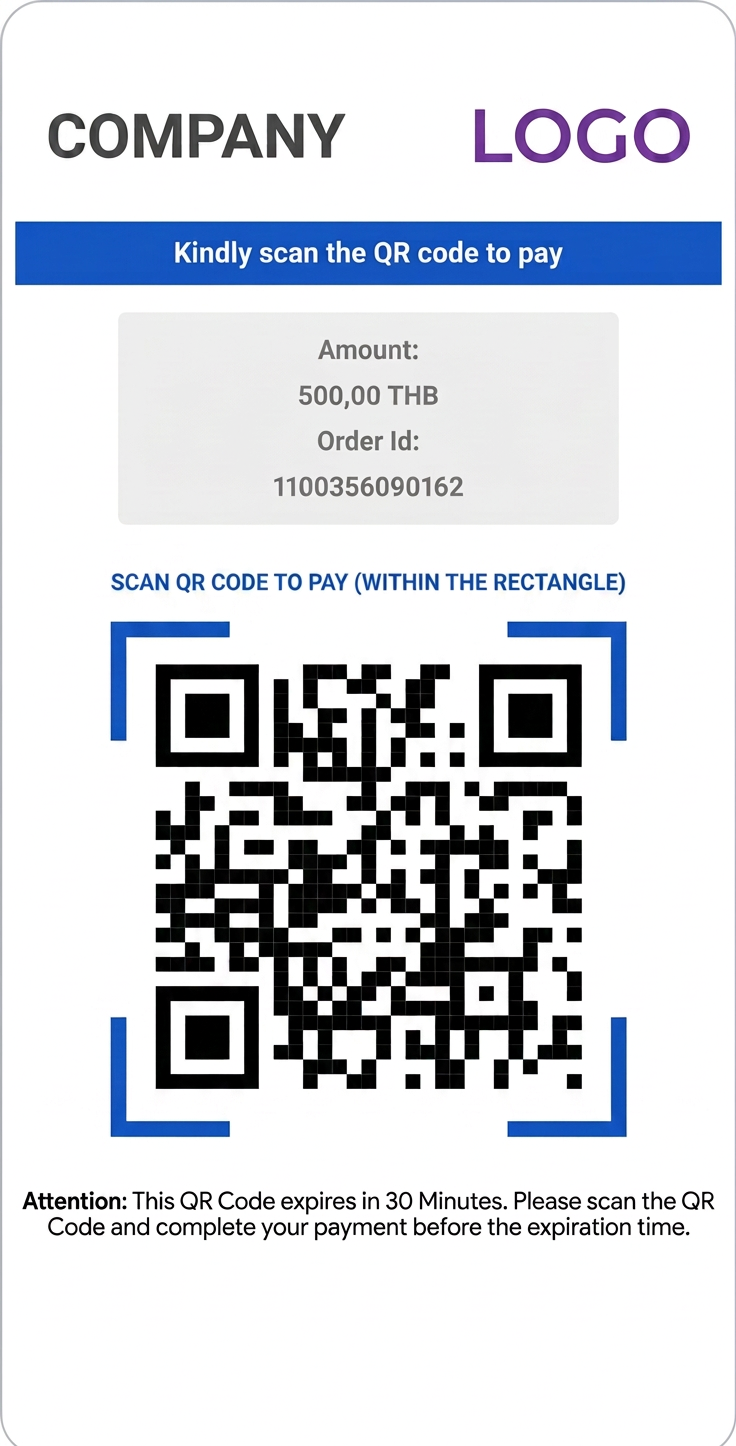
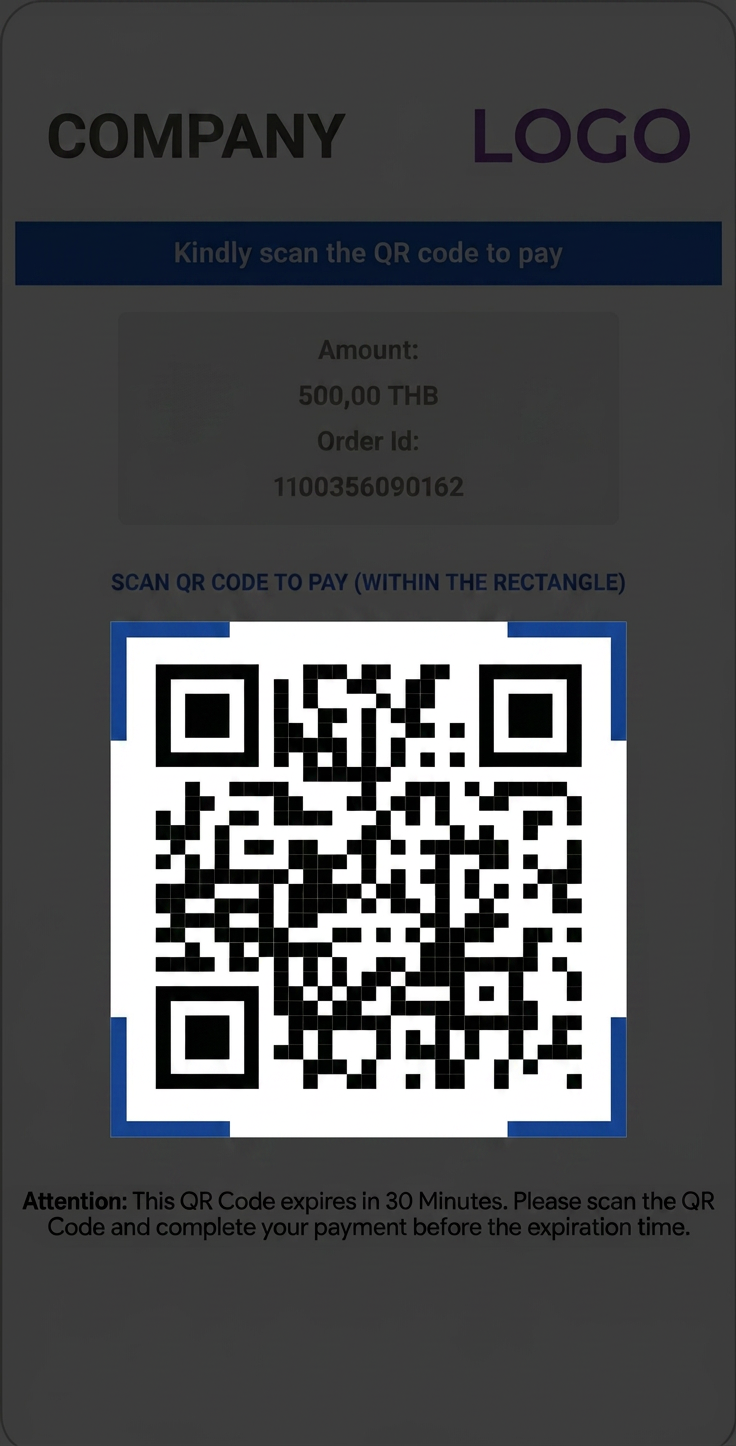
5.2 The user scans the QR code in an app that supports Thai QR code payments.
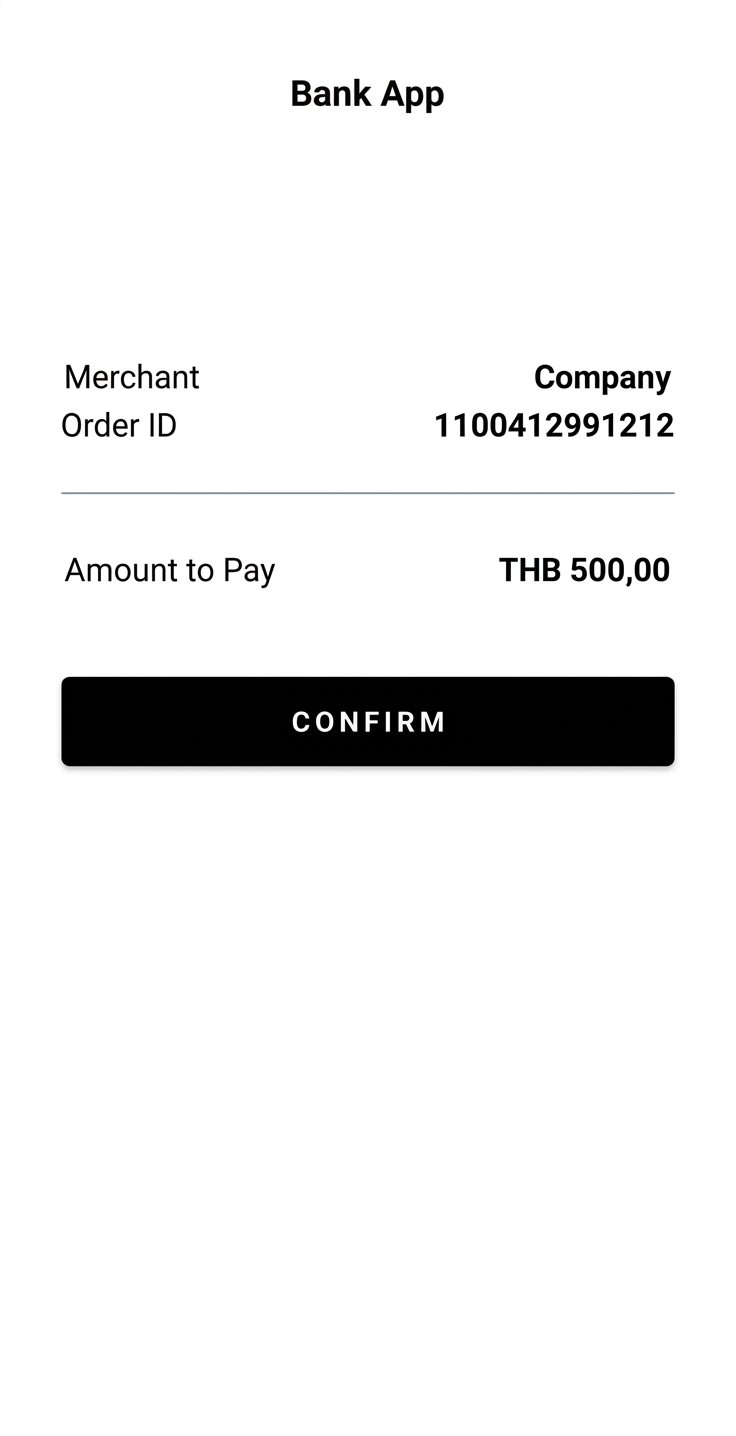
5.3 The user confirms the payment in the app.
-
After the user makes the payment, you will receive a
payment_finishedwebhook containing the payment result from Smart Glocal. Thesucceededstatus indicates a successful payment.Webhook example
curl -X POST \https://partner.com \-H 'content-type: application/json' \-H 'X-PARTNER-SIGN: signature' \-d '{"type": "payment_finished","status": "ok","session": {"id": "ps_12345","status": "accepted","created_at": "2025-12-04T07:48:28.275964Z","updated_at": "2025-12-04T07:49:43.022068Z","acquiring_payments": [{"id": "pm_12354","status": "succeeded","created_at": "2025-12-04T07:48:28.296138Z","finished_at": "2025-12-04T07:49:43.002789Z","customer": {"reference": "qwiqwi"},"participant_details": {"sender": {"full_name": "Name Surname","email": "email@example.com","document": "1234567890123"}},"payment_details": {"type": "internet_banking","internet_banking": {"type": "country_ewallet_promptpay","country_ewallet": {"country_iso2": "TH"}}},"amount_details": {"amount": 10000,"currency": "thb"},"metadata": {"key": "value"},"payment_options": {"return_url": "https://smart-glocal.com","recurrent": false}}],"actions": {"confirm": "2025-12-04T07:48:28.327146Z","capture": "2025-12-04T07:49:42.965552Z"}}}'
Sequence diagram