UPI payments in India
You can use India's Unified Payments Interface (UPI) to make payments via mobile apps using QR codes or UPI IDs without entering card details.
Currency: INR and USD
Minimum payment amount: 1 INR
Mandatory parameters
Note that some parameters below are extra to those required for a standard payment. Please do not forget to get all the required sender data on your own.
| Name | Type | Description |
|---|---|---|
payment_details | object | Payment data |
type | string | Always: bank_account |
bank_account | object | Payer's account description |
system_type | string | Always: upi |
upi | object | Always: {} |
participant_details | object | Participant details |
sender | object | Sender details |
full_name | string | Sender's full name (3–50 characters) |
email | string | Sender's email address (up to 64 characters before @, the total length must not exceed 100 characters) |
document | string | Document (up to 30 characters) |
msisdn | string | Phone number (up to 15 characters, without + ) |
state | string | Sender's state (up to 10 characters) |
city | string | Sender's city (3–50 characters) |
street | string | Sender's street (4–100 characters) |
building | string | Building number |
amount_details | object | Payment amount details |
amount | int | Payment amount in minor currency units. To pay 100 INR, write 10000 |
currency | string | ISO 4217 currency code. Case insensitive. Options: inr, usd |
payment_options | object | Payment options |
return_url | string | URL to redirect the payer back to after the payment |
metadata | object | Additional information |
key | string | Metadata |
customer | object | User details |
reference | string | Payer's identifier in your system |
Making a one-time payment
-
Create a session using the
session/createmethod.Alternatively, you can use the
session/init/paymentmethod. In this case, specify all the payment parameters right away and skip the next step. -
Send a
session/start/paymentrequest. Specify the following parameters:bank_accountinpayment_details.typeandupiinpayment_details.bank_account.system_type- the payer's
full_name,email,documentand address details inparticipant_details.sender - the URL to redirect the payer back to after the payment in
payment_options.return_url
To make later recurring payments, send
"recurrent": truein thepayment_optionsobject.Request example
curl -X POST \https://demo.smart-glocal.com/api/v1/session/start/payment \-H 'content-type: application/json' \-H 'X-PARTNER-PROJECT: your_project_name' \-H 'X-PARTNER-SIGN: signature' \-d '{"session_id": "ps_3230","payment_details": {"type": "bank_account","bank_account": {"system_type": "upi","upi": {}}},"participant_details": {"sender": {"full_name": "Ram Devi","email": "ramdevi@example.com","document": "HSECT4378A","msisdn": "8826320796","state": "Goa","city": "Panaji","street": "Maddo Vaddo","building": "1207"}},"amount_details": {"amount": 10000,"currency": "inr"},"payment_options": {"return_url": "https://website.com","recurrent": true},"metadata": {"key": "value"},"customer": {"reference": "qwiqwi"}}'Response example
{"status": "ok","session": {"id": "ps_3230","status": "in_progress","created_at": "2025-12-04T07:48:28.275964Z","updated_at": "2025-12-04T07:48:28.296138Z","acquiring_payments": [{"id": "pm_566184419","status": "in_progress","created_at": "2025-12-04T07:48:28.296138Z","customer": {"reference": "qwiqwi"},"payment_details": {"type": "bank_account","bank_account": {"system_type": "upi","upi": {}}},"amount_details": {"amount": 10000,"currency": "inr"},"participant_details": {"sender": {"full_name": "Ram Devi","email": "ramdevi@example.com","document": "HSECT4378A","msisdn": "8826320796","state": "Goa","city": "Panaji","street": "Maddo Vaddo","building": "1207"}},"payment_options": {"return_url": "https://website.com","recurrent": true}}]}} -
Wait for a
ready_to_confirmwebhook. When you receive it, it means that Smart Glocal is ready to make the payment and is waiting for your confirmation.Webhook example
curl -X POST \https://partner.com \-H 'content-type: application/json' \-H 'X-PARTNER-SIGN: signature' \-d '{"type": "ready_to_confirm","session": {"id": "ps_3230","status": "in_progress","created_at": "2025-12-04T07:48:28.275964Z","updated_at": "2025-12-04T07:48:28.310412Z","next_action": "confirm","acquiring_payments": [{"id": "pm_566184419","status": "pending","created_at": "2025-12-04T07:48:28.296138Z","customer": {"reference": "qwiqwi"},"payment_details": {"type": "bank_account","bank_account": {"system_type": "upi","upi": {}}},"amount_details": {"amount": 10000,"currency": "inr"},"participant_details": {"sender": {"full_name": "Ram Devi","email": "ramdevi@example.com","document": "HSECT4378A","msisdn": "8826320796","state": "Goa","city": "Panaji","street": "Maddo Vaddo","building": "1207"}},"payment_options": {"return_url": "https://website.com","recurrent": true}}]}}' -
Send a
session/confirmrequest to confirm the operation or asession/cancelrequest to cancel it.Request example
curl -X POST \https://demo.smart-glocal.com/api/v1/session/confirm \-H 'content-type: application/json' \-H 'X-PARTNER-PROJECT: your_project_name' \-H 'X-PARTNER-SIGN: signature' \-d '{"session_id":"ps_3230"}' -
Wait for an
action_requiredwebhook. Thecustomer_interaction.redirect.urlparameter contains a link to the local payment method page.Webhook example
curl -X POST \https://partner.com \-H 'content-type: application/json' \-H 'X-PARTNER-SIGN: signature' \-d '{"type": "action_required","session": {"id": "ps_3230","status": "in_progress","created_at": "2025-12-04T07:48:28.275964Z","updated_at": "2025-12-04T07:48:29.104377Z","acquiring_payments": [{"id": "pm_566184419","status": "pending","created_at": "2025-12-04T07:48:28.296138Z","customer": {"reference": "qwiqwi"},"payment_details": {"type": "bank_account","bank_account": {"system_type": "upi","upi": {}}},"amount_details": {"amount": 10000,"currency": "inr"},"participant_details": {"sender": {"full_name": "Ram Devi","email": "ramdevi@example.com","document": "HSECT4378A","msisdn": "8826320796","state": "Goa","city": "Panaji","street": "Maddo Vaddo","building": "1207"}},"payment_options": {"return_url": "https://website.com","recurrent": true},"customer_interaction": {"type": "redirect","redirect": {"url": "https://payment-system.com/pay?id=566184419","base_url": "https://payment-system.com/pay","method": "GET","qs": {"id": "566184419"}}}}],"actions": {"confirm": "2025-12-04T07:48:28.327146Z"}}}'After the
action_requiredwebhook is received, the user will be redirected to the bank's/payment system's app to confirm the payment. Below is an example of the app interface.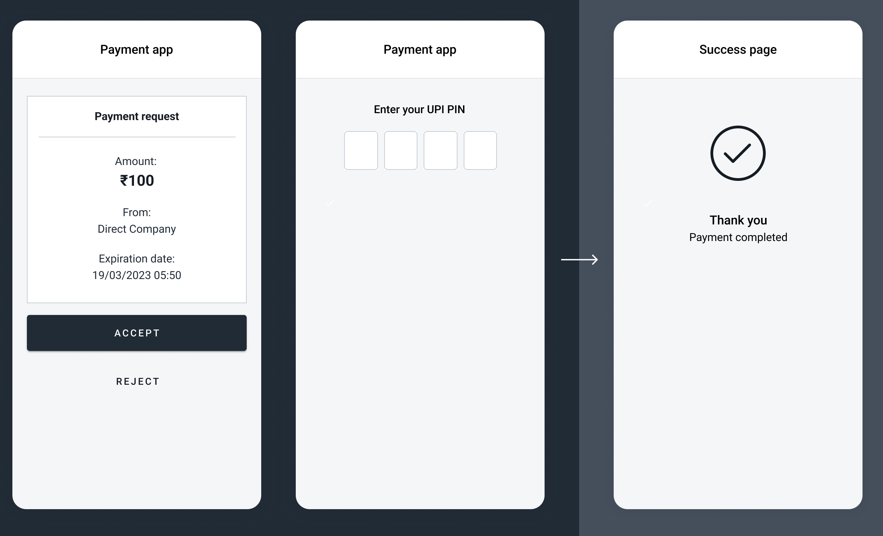
-
After the user makes the payment, you will receive a
payment_finishedwebhook containing the payment result from Smart Glocal. Thesucceededstatus indicates a successful payment.Webhook example
curl -X POST \https://partner.com \-H 'content-type: application/json' \-H 'X-PARTNER-SIGN: signature' \-d '{"type": "payment_finished","session": {"id": "ps_3230","status": "accepted","created_at": "2025-12-04T07:48:28.275964Z","updated_at": "2025-12-04T07:49:43.022068Z","acquiring_payments": [{"id": "pm_566184419","status": "succeeded","created_at": "2025-12-04T07:48:28.296138Z","finished_at": "2025-12-04T07:49:43.002789Z","customer": {"reference": "qwiqwi"},"payment_details": {"type": "bank_account","bank_account": {"system_type": "upi","upi": {}}},"amount_details": {"amount": 10000,"currency": "inr"},"participant_details": {"sender": {"full_name": "Ram Devi","email": "ramdevi@example.com","document": "HSECT4378A","msisdn": "8826320796","state": "Goa","city": "Panaji","street": "Maddo Vaddo","building": "1207"}},"payment_options": {"return_url": "https://website.com","recurrent": true},"recurrent": {"token": "6a6a29c4193a8e1049231e1497a3c5f180e120b20db81b39f53ec478029b53cf","created_at": "2025-12-04T07:49:43.002789Z","finished_at": "2035-12-04T07:49:43.002789Z","is_active": true,"type": "recurrent_token"}}],"actions": {"confirm": "2025-12-04T07:48:28.327146Z"}}}'
Making a recurring MIT payment
Once you made a one-time payment with "recurrent": true and received a recurring token in the recurrent object, you can make recurring payments.
To make a recurring payment, complete the steps above, but send the received token in the session/start/payment request instead of UPI details.
Request example
curl -X POST \
  https://demo.smart-glocal.com/api/v1/session/start/payment \
  -H 'content-type: application/json' \
  -H 'X-PARTNER-PROJECT: your_project_name' \
  -H 'X-PARTNER-SIGN: signature' \
  -d '{
    "session_id":"ps_3230",
    "payment_details": {
      "type": "recurrent",
      "recurrent": {
        "token": "6a6a29c4193a8e1049231e1497a3c5f180e120b20db81b39f53ec478029b53cf"
      }
    },
    "amount_details": {
      "amount": 10000,
      "currency": "inr"
    },
    "customer": {
      "reference": "qwiqwi"
    }
  }'