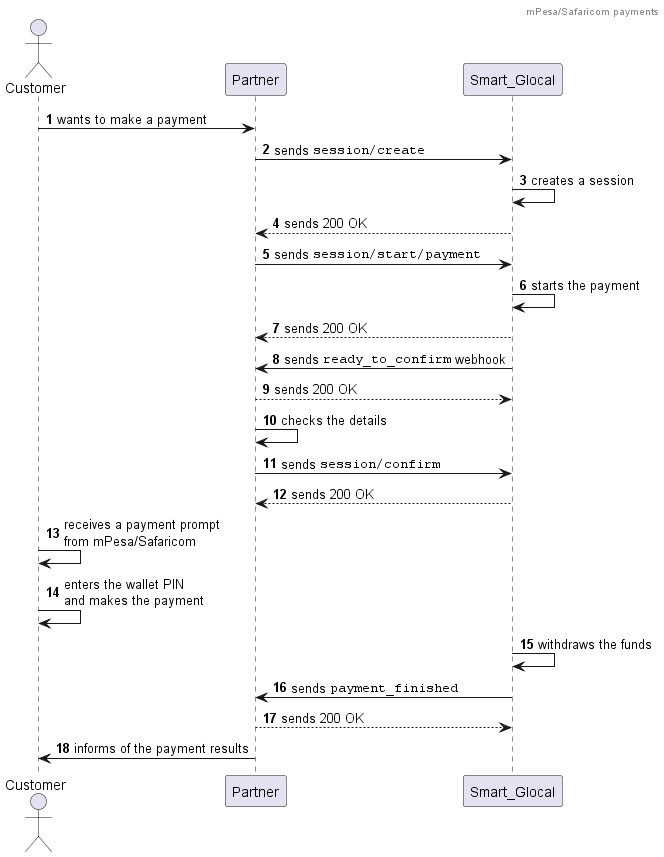
mPesa/Safaricom payments in Kenya
You can make mPesa/Safaricom payments in Kenya in Kenyan shillings (KES).
Minimum payment amount: 51 KES
KES has no minor currency units. To pay 1,000 KES, write 1000 in amount_details.amount.
No recurring payments are available.
Required sender parameters
Check all the required parameters
| Name | Type | Description |
|---|---|---|
participant_details | object | Information on the participants |
sender | object | Sender details |
full_name | string | Sender's full name (3–50 characters) |
email | string | Sender's email address (up to 64 characters before @) |
document | string | National ID Card or Maisha ID (6 to 9 digits) |
msisdn | string | Phone number (up to 15 characters, without + ) |
Making a payment
-
Create a session using the
session/createmethod.Alternatively, you can use the
session/init/paymentmethod. In this case, specify all the payment parameters right away and skip the next step. -
Send a
session/start/paymentrequest. Specify the following parameters:country_ewallet_safaricomininternet_banking.typeKEininternet_banking.country_ewallet.country_iso2- the payer's
full_name,email,msisdn, anddocumentinparticipant_details.sender
Optionally, you can add a return URL to redirect the customer back after the payment (payment_options.return_url).
Request example
curl -X POST \https://demo.smart-glocal.com/api/v1/session/start/payment \-H 'content-type: application/json' \-H 'X-PARTNER-PROJECT: your_project_name' \-H 'X-PARTNER-SIGN: signature' \-d '{"session_id": "ps_12345","payment_details": {"type": "internet_banking","internet_banking": {"type": "country_ewallet_safaricom","country_ewallet": {"country_iso2": "KE"}}},"amount_details": {"amount": 1000,"currency": "kes"},"customer": {"reference": "qwiqwi"},"participant_details": {"sender": {"full_name": "Name Surname","email": "email@example.com","document": "123456","msisdn": "12345678901"}},"payment_options": {"return_url": "https://smart-glocal.com/","recurrent": false}}'Response example
curl -X POST \https://partner.com \-H 'content-type: application/json' \-H 'X-PARTNER-SIGN: signature' \-d '{"status": "ok","session": {"id": "ps_12345","status": "in_progress","created_at": "2025-12-04T19:28:58.077701Z","updated_at": "2025-12-04T19:29:23.216667Z","acquiring_payments": [{"id": "pm_12354","status": "in_progress","created_at": "2025-12-04T19:29:23.217101Z","customer": {"reference": "qwiqwi"},"payment_details": {"type": "internet_banking","internet_banking": {"type": "country_ewallet_safaricom","country_ewallet": {"country_iso2": "KE"}}},"amount_details": {"amount": 1000,"currency": "kes"},"participant_details": {"sender": {"full_name": "Name Surname","email": "email@example.com","document": "123456","msisdn": "12345678901"}},"payment_options": {"return_url": "https://smart-glocal.com/","recurrent": false}}]}}' -
Wait for a
ready_to_confirmwebhook. When you receive it, it means that Smart Glocal is ready to make the payment and is waiting for your confirmation.Webhook example
curl -X POST \https://partner.com \-H 'content-type: application/json' \-H 'X-PARTNER-SIGN: signature' \-d '{"type": "ready_to_confirm","status": "ok","session": {"id": "ps_12345","status": "in_progress","created_at": "2025-12-04T19:28:58.077701Z","updated_at": "2025-12-04T19:29:23.216667Z","acquiring_payments": [{"id": "pm_12354","status": "pending","created_at": "2025-12-04T07:48:28.296138Z","customer": {"reference": "qwiqwi"},"payment_details": {"type": "internet_banking","internet_banking": {"type": "country_ewallet_safaricom","country_ewallet": {"country_iso2": "KE"}}},"amount_details": {"amount": 1000,"currency": "kes"},"participant_details": {"sender": {"full_name": "Name Surname","email": "email@example.com","document": "123456","msisdn": "12345678901"}},"payment_options": {"return_url": "https://smart-glocal.com/","recurrent": false}}],"actions": {"confirm": "2025-12-04T07:48:28.275964Z"}}}' -
Send a
session/confirmrequest to confirm the operation or asession/cancelrequest to cancel it.Request example
curl -X POST \https://demo.smart-glocal.com/api/v1/session/confirm \-H 'content-type: application/json' \-H 'X-PARTNER-PROJECT: your_project_name' \-H 'X-PARTNER-SIGN: signature' \-d '{"session_id":"ps_12345"}' -
The customer receives a payment prompt on their phone from mPesa/Safaricom and enters their mobile wallet PIN to confirm the payment.
Note that you will not receive an
action_requiredwebhook: the customer confirms the payment on their phone. While waiting for thepayment_finishedwebhook, we recommend showing the customer a message that they need to confirm the payment on their phone.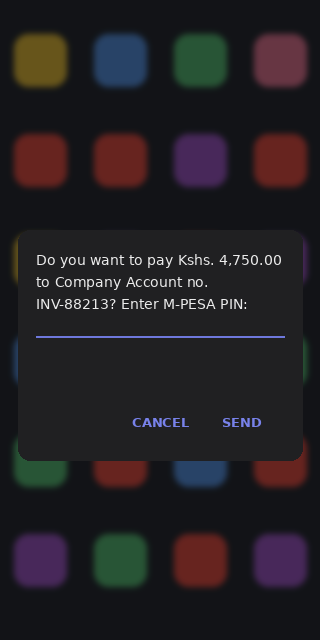
-
After the customer makes the payment, you will receive a
payment_finishedwebhook containing the payment result from Smart Glocal. Thesucceededstatus indicates a successful payment.Webhook example
curl -X POST \https://partner.com \-H 'content-type: application/json' \-H 'X-PARTNER-SIGN: signature' \-d '{"type": "payment_finished","status": "ok","session": {"id": "ps_12345","status": "accepted","created_at": "2025-12-04T07:48:28.275964Z","updated_at": "2025-12-04T07:49:43.022068Z","acquiring_payments": [{"id": "pm_12354","status": "succeeded","created_at": "2025-12-04T07:48:28.296138Z","finished_at": "2025-12-04T07:49:43.002789Z","customer": {"reference": "qwiqwi"},"payment_details": {"type": "internet_banking","internet_banking": {"type": "country_ewallet_safaricom","country_ewallet": {"country_iso2": "KE"}}},"amount_details": {"amount": 1000,"currency": "kes"},"participant_details": {"sender": {"full_name": "Name Surname","email": "email@example.com","document": "123456","msisdn": "12345678901"}},"metadata": {"key": "value"},"payment_options": {"return_url": "https://smart-glocal.com/","recurrent": false}}],"actions": {"confirm": "2025-12-04T07:48:28.327146Z","capture": "2025-12-04T07:49:42.965552Z"}}}'
Sequence diagram