Instant bank-to-bank transfers in India
You can use India'a Unified Payments Interface (UPI) to make instant bank-to-bank transfers via mobile apps using QR codes or UPI IDs without entering card details.
Currency: INR and USD
Minimum payment amount: 1 INR
To make a payment, complete the standard steps.
Mandatory parameters
Note that some parameters below are extra to those required for a standard payout. Please do not forget to get all the required sender data on your own.
| Name | Type | Description |
|---|---|---|
payment_details | object | Payment data |
type | string | Always: bank_account |
bank_account | object | Recipient's account description |
| `system_type1 | string | Always: upi |
upi | object | Always: {} |
participant_details | object | Participant details |
sender | object | Sender details |
full_name | string | Sender's full name (3–50 characters) |
email | string | Sender's email address (up to 64 characters before @, the total length must not exceed 100 characters) |
document | string | Document (up to 30 characters) |
msisdn | string | Phone number (up to 15 characters, without + ) |
state | string | Sender's state (up to 10 characters) |
city | string | Sender's city (3–50 characters) |
street | string | Sender's street (4–100 characters) |
building | string | Building number |
amount_details | object | Payment amount details |
amount | int | Payout amount in decimal format. To send 100 USD, write 10000 |
currency | string | ISO 4217 currency code. Case insensitive. Options: inr, usd |
metadata | object | Additional information |
key | string | Metadata |
customer | object | User details |
reference | string | Sender reference identifier |
Request example
curl -X POST \
  https://demo.smart-glocal.com/api/v1/session/start/payment \
  -H 'content-type: application/json' \
  -H 'X-PARTNER-PROJECT: your_project_name' \
  -H 'X-PARTNER-SIGN: signature' \
  -d '{
    "session_id": "ps_3230",
    "payment_details": {
      "type": "bank_account",
      "bank_account": {
        "system_type": "upi",
        "upi": {}
      }
    },
    "participant_details": {
      "sender": {
        "full_name": "Ram Devi",
        "email": "ramdevi@example.com",
        "document": "HSECT4378A",
        "msisdn": "8826320796",
        "state": "Goa",
        "city": "Goa",
        "street": "Maddo Vaddo",
        "building": "1207"
      }
    },
    "amount_details": {
      "amount": 10000,
      "currency": "INR"
    },
    "metadata": {
      "key": "value"
    },
    "customer": {
      "reference": "qwiqwi"
    }
}'
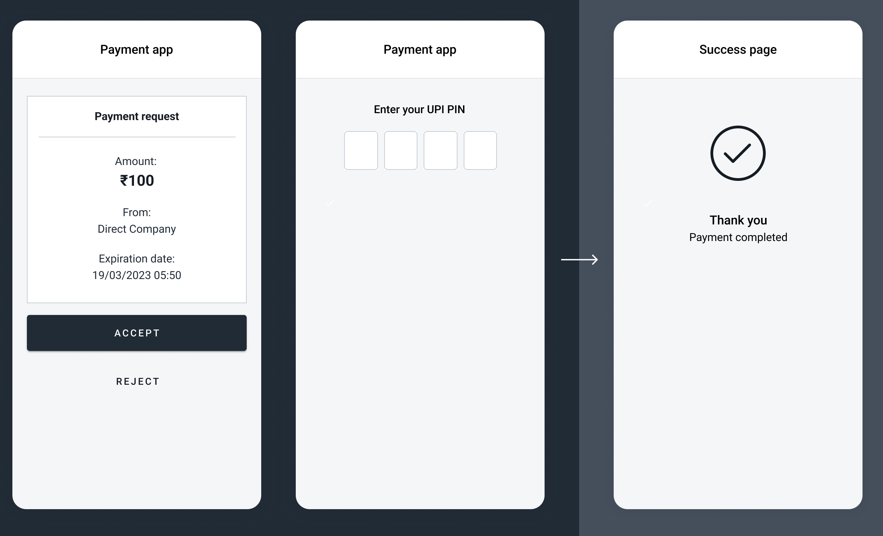
Screen examples
After the action_required webhook is received, the user will be redirected to the bank's/payment system's app to confirm the payment. Below is an example of the app interface.