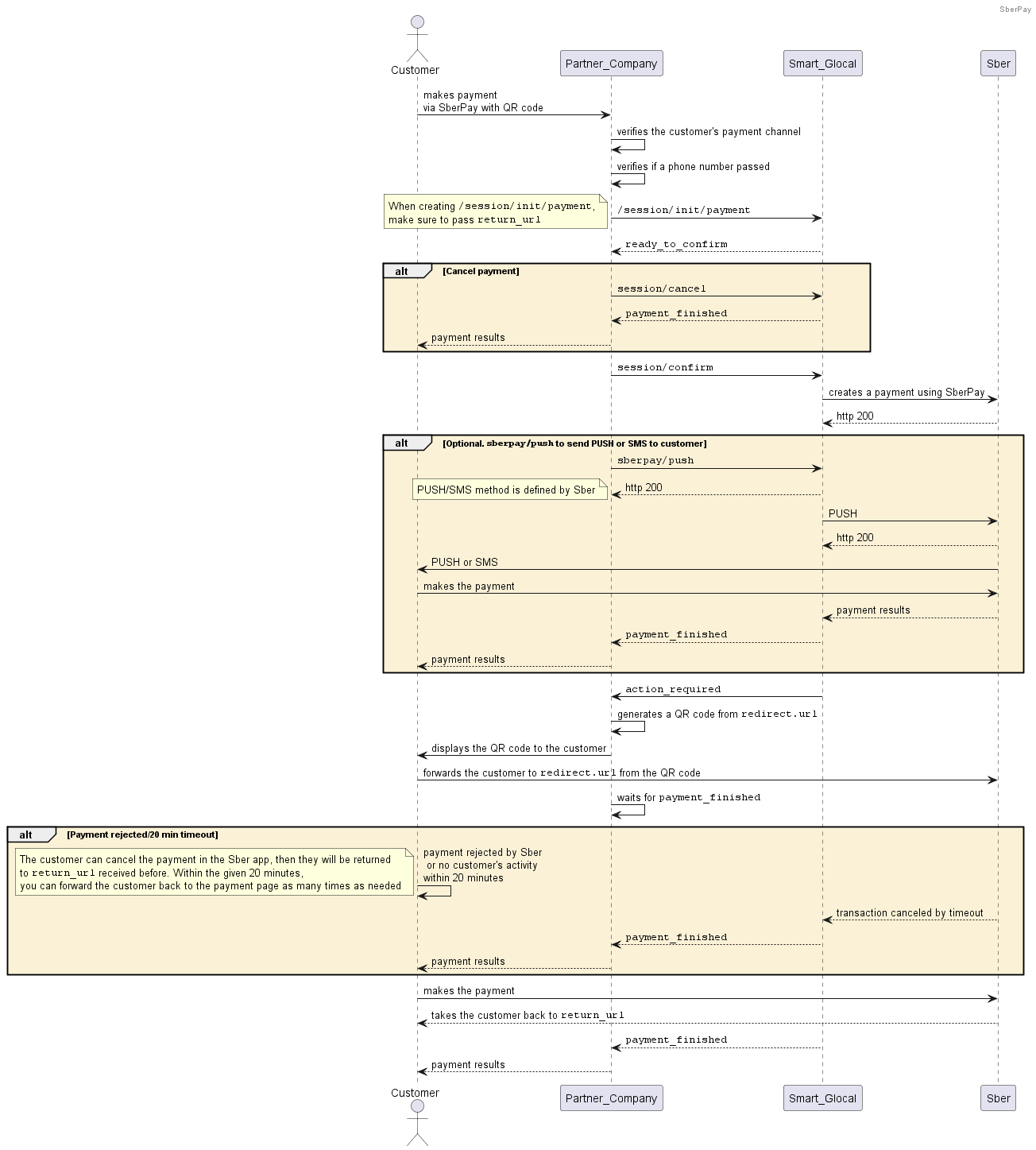
SberPay with a QR code
This scenario describes how to receive payments via SberPay with QR codes. These payments do not require card details from customers.
Please note that you generate a QR code to provide it to your customer using the link from the
redirect.urlparameter passed within theaction_requiredwebhook.
You should confirm a payment within 20 minutes by sending session/confirm. Otherwise, the session terminates within 20 minutes with the canceled status.
How to make a payment
-
Create a payment session sending a
session/createrequest and pass the required parameters including the payment channel (channel) and URL to forward the customer to a Sber application (return_url).Alternatively, you can use the
session/init/paymentmethod. In this case, specify all the payment parameters right away and skip the next step. -
Send a
session/start/paymentrequest with the remaining mandatory parameters. -
Wait for a
ready_to_confirmwebhook confirming that Smart Glocal is ready to process the payment and is waiting for your confirmation. -
Confirm your payment by sending a
session/confirmrequest, or cancel the payment sending asession/cancelrequest.You can also use the
sberpay/pushmethod to additionally send PUSH or SMS notifications to customers (PUSH/SMS notification channel is set by Sber). -
Wait for an
action_requiredwebhook containing a link within theredirect.urlparameter. Generate a QR code from this link and show ot the customer. -
Wait until the customer approves or cancels the payment. After that, Sber takes the customer back to the URL or deeplink passed within the
return_urlparameter. -
Wait for a
payment_finishedwebhook with the transaction results.If the customer cancels the transaction, the transaction status will renew only after 20 minutes, as soon as the lifetime of the customer's order ends.
-
Pass the transaction status to the customer.
Request example
curl -X POST \
  https://demo.smart-glocal.com/api/v1/session/init/payment \
  -H 'Content-Type: application/json' \
  -H 'X-PARTNER-PROJECT: your_project_name' \
  -H 'X-PARTNER-SIGN: signature' \
  -d '{
    "payment_details": {
      "type": "internet_banking",
      "internet_banking": {
        "type": "sber_pay",
        "sber_pay": {
          "phone": "71234567890",
          "channel": "mobile_web"
        }
      }
    },
    "amount_details": {
      "amount": 1000,
      "currency": "RUB"
    },
    "metadata": "mobile_web",
    "customer": {
      "reference": "user-ebf7-4815-af0a-b1f77e6de7e7"
    },
    "payment_options": {
      "return_url": "https://smart_glocal.com"
    }
  }'
Response example
{
  "status": "ok",
  "session": {
    "id": "ps_12345",
    "status": "in_progress",
    "created_at": "2025-09-29T05:42:10.549869Z",
    "updated_at": "2025-09-29T05:42:10.948457Z",
    "acquiring_payments": [{
      "id": "pm_3230",
      "status": "in_progress",
      "created_at": "2025-09-29T05:42:10.973559Z",
      "customer": {
        "reference": "user-ebf7-4815-af0a-b1f77e6de7e7"
      },
      "payment_details": {
        "type": "internet_banking",
        "internet_banking": {
          "type": "sber_pay",
          "sber_pay": {
            "phone": "71234567890",
            "channel": "mobile_web"
          }
        }
      },
      "amount_details": {
        "amount": 1000,
        "currency": "RUB"
      },
      "metadata": "order123",
      "payment_options": {
        "return_url": "https://smart_glocal.com",
        "recurrent": false
      }
    }]
  }
}